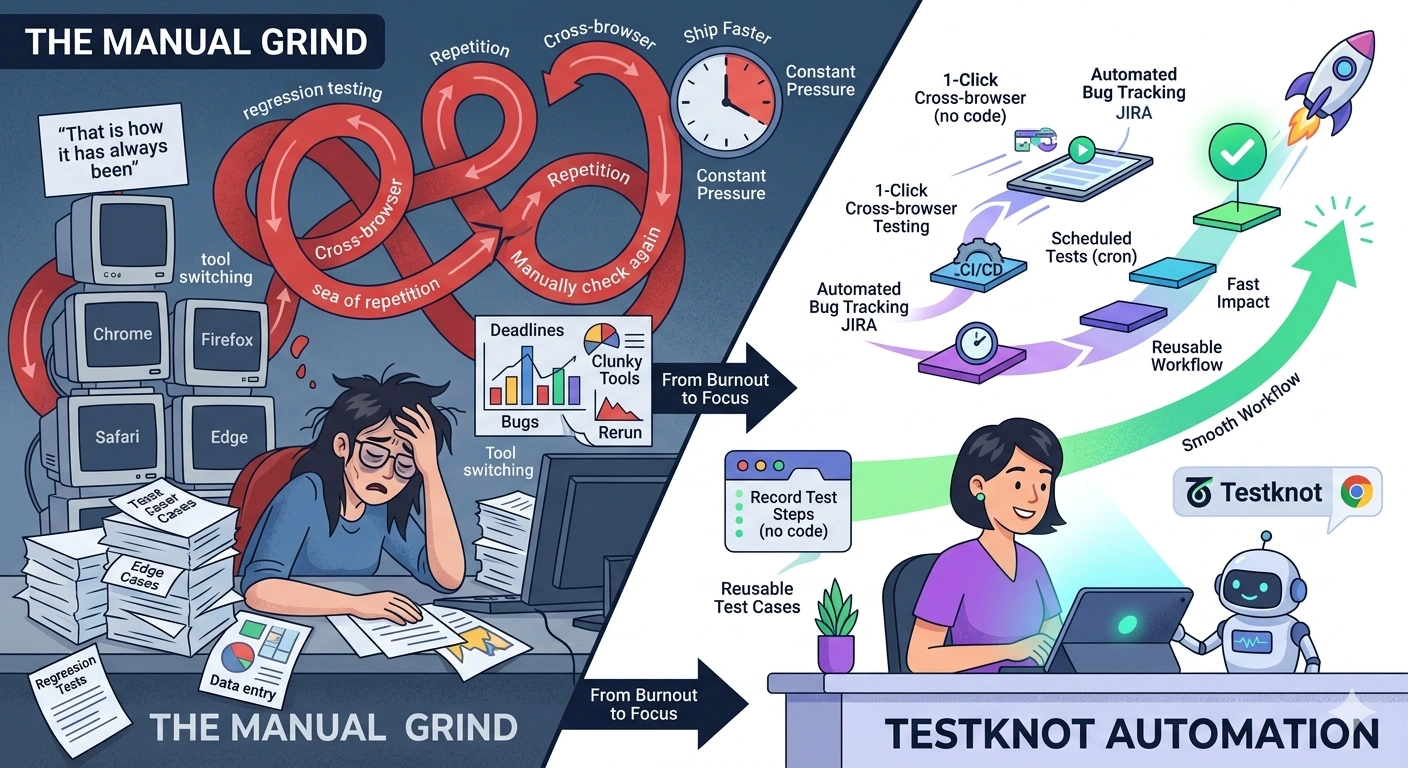
You don’t need a bigger QA team to move faster, all you need is smarter processes. The trick is automating anything repetitive, reusing what you already have, and plugging your testing directly into your development pipeline. Testknot was built to let teams do exactly that, even if they’re low on coding skills. Suddenly you’re covering more ground without making things messier.
Why QA Teams Feel Stuck
Here’s what always happens: the workload keeps ballooning, but the team doesn’t grow. Every release means more test cases. Every tiny change means rerunning old ones. Manual work piles up, there’s no off switch. Everyone assumes hiring’s the answer, but recruiting takes forever, onboarding eats time, and the release schedule does not care.
If you look closer, the real issue is that QA engineers spend way too much time on stuff that doesn’t need their judgment, just rinse-and-repeat tasks that a smart system could easily handle. That’s where the hidden capacity lives.
Where Does the Time Go?
Regression testing is the big culprit. Teams run the same flows over and over after every release to check nothing broke, even in spots untouched by the update. Then there’s cross-browser testing: Chrome, Firefox, Edge, Safari. Now add multi-environment runs: QA, staging, production. That one test case? It goes from one effort to twelve by the time you check all combinations manually.
It gets worse. Bug reporting is a separate slog, saving screenshots, writing steps for JIRA, gathering evidence by hand. It’s important work, sure, but almost all of it could be streamlined.
How Testknot Helps Teams Get More Done
At Testknot, we focused on the parts of QA that suck up time but don’t need expert hands. The browser extension records every test step as you click through, grabbing selectors and actions while you work, no code required. What used to take hours to script is ready in minutes, and QA does it all on their own, no developer needed.
Cross-browser checks run from one dashboard, no extra setups. Need to test in three environments? Just switch contexts and tag results, no recreating tests. Clone and reuse cases whenever you want. Add dynamic data so a single test covers multiple scenarios, better coverage, less clutter.
Capgemini’s World Quality Report backs it up: teams using low-code automation ship tests faster and hit broader coverage, without swelling their ranks. Turns out, the capacity was there all along. The problem was clunky tooling.
Integrating Testing With Your Dev Pipeline
Manual test triggers quietly suck up so much capacity. Someone has to remember to start the tests, babysit them, and check for results before closing the loop. It becomes a scheduling headache on top of the workload.
connects directly with Jenkins, GitHub Actions, and GitLab. Tests run automatically with every build, nobody needs to push a button. Failure alerts ping Slack or Teams in real time, so the right people hear bad news as it happens. Schedule nightly runs and regular regression cycles; cron jobs handle the busy work. Teams keep an eye on more tests, without everyone hovering over every task.
Short version: manual triggers, monitoring, chasing down results, poof, gone. Test coverage doesn’t drop, but your team gets that time right back.
Smoother Reporting After Testing
Automation helps with repetitive work that does not need human judgement. Regression tests that run every release are a good example. Cross browser checks with the same steps are another. In these cases, manual effort adds little value but takes a lot of time.
With Testknot everything hooks right into JIRA. Screenshots and traceability links attach automatically when a test fails. Engineers don’t piece together evidence. Developers don’t beg for details. You get step-by-step screenshots, test run videos, shareable HTML reports, everything’s ready for anyone to access. No extra emailing or chasing needed.
All that saved time? You can spend it on actual testing, not paperwork, which is where good QA shines.
What Does This Look Like on a Real Team?
QA teams using Testknot record new tests in minutes with the browser extension, clone scenarios, run across four browsers and three environments, no reconstruction needed. Results and evidence flow to JIRA instantly when something fails. The whole regression suite runs on schedule, and the team only gets pinged when action’s required.
Before, you spent two days per release, running manual checks, hand-logging bugs, hunting for evidence. Testknot handles that. Your team focuses on deeper exploratory testing and tricky edge cases, where your skill actually matters.
Conclusion
Speeding up testing isn’t about working harder, it’s about making sure your team is only doing work that actually needs their expertise. Regression checks, cross-browser runs, manual bug logging, and test triggers chew up tons of capacity without tapping your real skills.
Testknot cuts out the friction: anyone can automate tests (no coding needed), connect them to the pipeline for hands-free execution, and report bugs instantly with full evidence. The swap from manual to automated wastes way less time.
If this sounds like something your team could use, grab a free demo with Testknot
Frequently asked questions
Automate the repetitive stuff that doesn’t need human judgment, regression, cross-browser, multi-environment tests are where you start. Tools like Testknot let you do it without writing code, so you don’t need developer help to get moving.
Regression testing, cross-browser checks, multi-environment runs, and manual bug reporting are the big time sinks. These routine tasks are perfect for automation, they don’t need skilled judgment, just consistent execution.
Absolutely. Testknot's browser extension records normal actions as test steps, no coding. QA engineers build, manage, and update tests themselves. No developer help required, so teams without heavy coding chops can still automate.
It kills manual triggers. Tests run automatically with every build. Failures send alerts to Slack or Teams right away. Scheduled runs handle regular regression checks, so nobody needs to babysit the process.
Jump on regression and cross-browser tests, those chew up the most time and don’t need much judgment. Automating them drops manual work fast and frees your team up for testing that actually benefits from human insight.